

cross-posted from: https://piefed.social/c/linux4noobs/p/1953356/my-pc-is-making-a-high-pitched-noise-like-coil-whine-only-under-linux
So I built a new PC a couple weeks ago. My old one broke one day (I think I helped it, but that’s another story). I was happy to move from a stock Prism Wraith cooler that was LOUD and ANNOYING. I put a new AMD Ryzen 9 7900X in this box with a couple of new nvme drives (Samsung 9100 PRO and 990 PRO). The thing is silent under Windows 11. Silence at last!
Then I installed openSUSE Tumbleweed (from which I’m typing this) and as the post title says, something is making a high-pitched noise, like coil whine, when the system is mostly idle. I searched the web and the first suggestion is that Linux handles CPU power states (C-state) differently than Windows. Or, it could be the new disk(s), too. It’s a fly in the ointment, I am very happy with the new PC, with how powerful and fast it is, I’m so far happy with openSUSE, but there HAD TO be SOMETHING to spoil the experience.
Has anybody had a similar problem? Any tips on how to troubleshoot it and not BREAK my computer?
EDIT: more info from the comments
I just use the Ryzen iGPU, don’t have a dedicated GPU. I set the fan curves in BIOS, so it’s the same across all OSes. I’m pretty sure it’s not the fans. My main suspect is the CPU because the noise is there in openSUSE’s installer, so even before anything touched the disks (they were straight from factory with no partitions). As soon as I launched the Tumbleweed installer I heard it. Not hearing it in Windows 11. I can hear it when the CPU is idle, if I start some program, run a compiler or even scroll fast in the web browser, there is no noise.
I had the same monitor for several years. I hear the noise from the PC case and I’m 100% sure about that. I used the same monitor with my previous PC and there was no noise, including in Fedora Workstation. This is a new PC.
The noise is audible in openSUSE’s installer, that’s the first time I heard it. So even before there was anything on either of those nvme disks, at that time they were straight from factory with no partitions.
I dual boot on this PC and the whine is not there in Windows 11, neither in BIOS. I have fan curves set in BIOS, so it’s the same across OSes.
✅ So I managed to troubleshoot and find the root cause. As suspected, it was the CPU, however I thought it was only the difference between how Windows and Linux manage its power profile. While troubleshooting, I ran hwinfo on my Windows install and also double checked the active power profile. It was set to the AMD Ryzen Balanced profile that was added automatically. If we look closer, it was set to always run in high performance mode so it never went into deep sleep and my Ryzen makes the whining sound only when in deep sleep (that would be the C6 state).
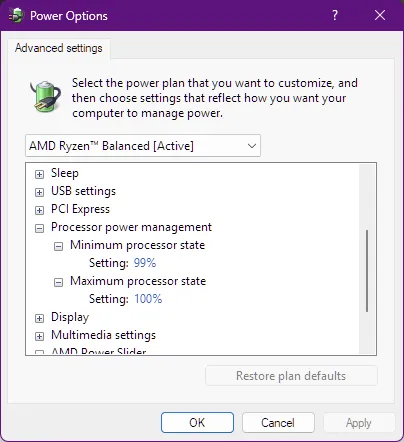

I think that Linux sets power efficient modes, even under performance*. The fix for me was not in the OS, but rather in UEFI BIOS. The magic setting for my motherboard (ASUS TUF GAMING B650E Plus WiFi) is at Advanced\AMD CBS\CPU Common Options\Power Supply Idle Control. It had to be changed to “Typical Current Idle”. Now I can keep running the balanced profile in openSUSE, so the CPU doesn’t operate at top frequency all the time and it is now SILENT, same as under Windows. :)
* at first I tried flipping between powerprofiles set balanced and powerprofiles set performance and for a minute I thought that was it, but not quite. Maybe balanced makes less sound, but still does it.
@CameronDev @steel_for_humans Android phones have no bios recovery or any similar. If the bootloader dies, that phone is over.
Accidentally killing the android bootloader is still “near impossible” from software. You can do it, but not easily by accident.
Ill also argue that wiping the bootloader is still software, not hardware damage. If your lucky, your phone may have a DFU mode cooked into the hardware that will let you restore the bootloader yourself, but failing that your OEM should be able to restore it. Whether they will and at what cost is a separate issue.
@CameronDev My impression is that you have not ever heard about your right over your own property (aka “rooting”), how the mafia tries to harden as they only can, committing both various license violations, illegal data collection, eavesdropping, spam and cheat. You do not understand, what is this comment about, and you go yet more far: instead of recognizing your own stupidity, you are even boosting that by thinking that I am.
Im well aware of rooting, and its both unrelated to the OP’s situation (which is a PC), and even with root, its still near impossible to accidentally break the bootloader.
You have to take some very deliberate steps in order to kill the android bootloader. It will not happen by tweaking the kernel scheduler.
And again, killing the bootloader is software, not hardware damage. It is reversible, albeit not easily reversible.
@CameronDev Your comment clearly shows that you have not ever rooted an Android.
Only for you: rooting the android requires various partition rewriting, decrypting etc operations, all of them in close interaction with the bootloader. It also interacts with various system components, which were originally open source, but the manufacturers modified them on unknown ways.
You school example of the criminal stupidity!