What is the advantage of this over just dropping HTML files onto a USB drive?


K3CAN
Also at @me@social.k3can.us on Mastodon.
- 2 Posts
- 83 Comments
Joined 3 years ago
Cake day: June 21st, 2023
You are not logged in. If you use a Fediverse account that is able to follow users, you can follow this user.
Not often, but there’s a niche. I wish I could remember the details, but I saw someone earlier this year that was hosting a public BBS on a c64.
 6·19 days ago
Same experience. 🫤
Personally, whenever I need to process anything text-based, I use perl.
Read the json into a hash, parse the values if desired, then plug the values into an html template.
It’s pretty quick to write, much easier to learn than python (in my opinion), and super powerful.
I’m a bit torn on the hardware bit, myself.
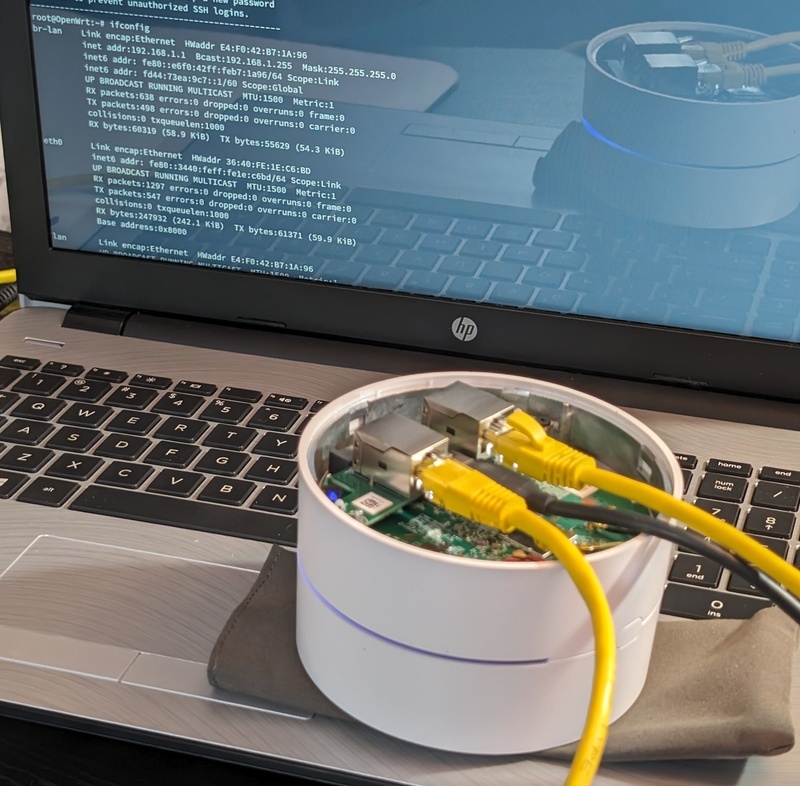
On one hand, hardware is a fundamental aspect of self hosting. There’s already a portion of the community who considers self-hosting to include using commercially-hosted cloud services (as long as it’s not Google), so prohibiting hardware discussion just reinforces that concept. Plus, it can be really fun to see what creative hardware people come up. I’m pretty sure I posted about my Fediverse server running on a WiFi router here, for example. The focus was on the unusual hardware, but it was also clearly related to self-hosting.
On the other hand, looking at what is posted in other communities, I don’t think there’s a ton of value in seeing a dozen photos of a bone-stock rpi or a closed laptop sitting on a desk. Same with the nth post asking if their 30-year-old 1u would be a good choice for Jellyfin; so I see why the rule exists.
Overall, though, I think hardware should be allowed, but maybe add a rule along the lines of “if you’re posting a question, please include what resources you’ve already reviewed or troubleshooting steps you’ve already taken.”
Heck, that might be a good rule for all questions, regardless of topic…
The first one. The service is owned by root, but the application is running as an unprivileged system user.
Quadlets work like any other systemd service.
You create the user/group you want to run as on the underlying system, then just specify that user/group in the quadlet file.
If you look at my *arr examples, you can see the user and groups they’re running as.
Podman quadlets can also auto-update and auto rollback, if needed.
Same here.
Pulling doesn’t work if you don’t know when a system will be online, so it only makes sense for my laptop to push.
Seems to be specific to rewrites using an un-named capture.
grep -rnE "\$[0-9.*].*\?" /etc/ngnixshould show if you have any potentially vulnerable directives in your config.
It’s a function of a “pod” within podman.
I wrote the podman examples for AudioMuseAI using a pod: https://github.com/NeptuneHub/AudioMuse-AI/tree/main/deployment/podman-quadlets
And I have an example *arr suite on my GitHub page: https://github.com/K3CAN/podman-arr-quadlets
I’ll second podman quadlets. Good security, full integration with systemd, pods allow applications to easily share a namespace, and you can manage graphically through Cockpit if you really want to.
The only systems with ip6v in my network are Wi-Fi devices and my public-facing reverse proxy. I use a prefix delegated by my ISP.
All of my non-public servers have ipv4 only.
I use Wireguard.
For my phone, I use the “WG Tunnel” app: https://github.com/wgtunnel/android
It’s nice because it’ll automatically enable/disable it as I move between networks.
Before that, though I used the official client and I just kept it on 24/7. It’s not like it uses extra data or battery or anything.
Correct. Full-upgrade is the new term. It’s an alias, though, so using either will accomplish the same thing.
I’ll second that
Jellyfin can function as a music server, but it’s definitely a video server first. All the other media (music, books, podcasts, etc) are basically still treated like TV shows when it comes to how they need to be rigidly organized.
Navidrome on the other hand, can just take a pile of mp3s and sort everything out based on tags. Navidrome can also handle additional artists, so it can understand that “Eminem feat Elton John” isn’t a single artist. That was ultimately what made me switch from Jellyfin.
Personally, I ripped my CDs to MP3S, and convert anything I downloaded to MP3, as well. I’m no audiophile, so I really can’t tell the difference when listening; the difference is only noticeable when I look at my storage and bandwidth.
I’m not sure what Steady is, but it sounds like FreshRSS can do what you want. If you can read the articles on the website, then you should be able to use FreshRSS to scrape the site and create a feed from it. For content behind a login, I’m pretty sure FreshRSS can handle basic-auth or you can provide it cookies.
There’s also KillTheNewsLetter which does what you want the other way, by just converting the emails into an RSS feed. It can be self-hosted, but I haven’t tried it myself, though.
I agree with this.
Social media shouldn’t be a requirement to express yourself online. If you start with a website, then you can choose to share on social media if you want, or not, plus anyone who wants to follow the site can subscribe to the feed without needing an account themselves.
The 3DS on the other hand…
https://github.com/zoeyjodon/moonlight-N3DS