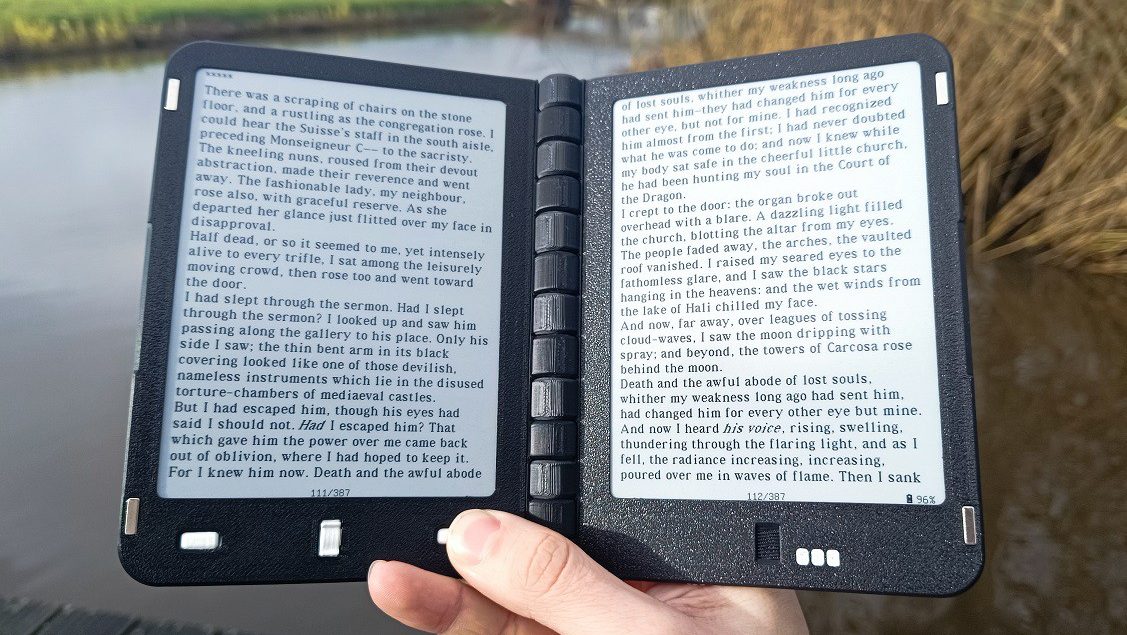
There are plenty of lovely e-readers out on the market that come with an nice big e-paper display. There aren’t nearly as many that come with two. [Martin den Hoed] developed the Diptyx e-rea…
Hello there, just scrolling through and I saw your comment. You seem to know a bit about this topic.
I’m currently thinking of buying a reader as I lost mine some time ago. I used a kobo and a kindle in the past and didn’t see much difference.
However, this thing about reading papers seems really cool. I have tried in the past reading PDFs on those readers without much success.
Do you think you have good options for reading articles/manuals?
Consider I end up printing about 50 pages a day in articles I read. If I can turn that into something digital that’d be cool.
If an 8-inch screen is enough for you, then I recommend either the Pocketbook Inkpad 4, or the Pocketbook Color 3 if you want color. They run Linux and have a very capable PDF Reader (especially compared to Kindles)
If you want an even bigger screen then sadly they start to get very expensive, and usually ship with an already outdated version of Android and an underpowered SOC. And they also have the terrible standby battery life you would expect from an Android device
I guess the size is good to me for reading. I guess the kindle and kobo I used to have were even smaller than that. For reading books that’s quite good to me and I never felt I needed something larger.
However, when I tried to read PDFs I had lots of problems. The readers either would show the full A4 page in the screen, which would make it unreadable, or show just a piece of the page and it would then be difficult to pan.
I remember I had tried using some tools which would break up the PDF pages into pages which would be visualizable in such a screen, but that did not work too well especially when reading articles with two column layouts.
Ideally articles would be available as ePub, but that’s quite rare.
The main point would be: if I get one such tool to read articles I can dedicate it to just that. But, I need it to be easy for such purpose: I don’t want to be panning up and down a page all the time.
I don’t know whether that is possible and how that could work however, because indeed resizing is not one of the objectives of PDF.


Hello there, just scrolling through and I saw your comment. You seem to know a bit about this topic. I’m currently thinking of buying a reader as I lost mine some time ago. I used a kobo and a kindle in the past and didn’t see much difference. However, this thing about reading papers seems really cool. I have tried in the past reading PDFs on those readers without much success.
Do you think you have good options for reading articles/manuals? Consider I end up printing about 50 pages a day in articles I read. If I can turn that into something digital that’d be cool.
If an 8-inch screen is enough for you, then I recommend either the Pocketbook Inkpad 4, or the Pocketbook Color 3 if you want color. They run Linux and have a very capable PDF Reader (especially compared to Kindles)
If you want an even bigger screen then sadly they start to get very expensive, and usually ship with an already outdated version of Android and an underpowered SOC. And they also have the terrible standby battery life you would expect from an Android device
I guess the size is good to me for reading. I guess the kindle and kobo I used to have were even smaller than that. For reading books that’s quite good to me and I never felt I needed something larger.
However, when I tried to read PDFs I had lots of problems. The readers either would show the full A4 page in the screen, which would make it unreadable, or show just a piece of the page and it would then be difficult to pan. I remember I had tried using some tools which would break up the PDF pages into pages which would be visualizable in such a screen, but that did not work too well especially when reading articles with two column layouts.
Ideally articles would be available as ePub, but that’s quite rare. The main point would be: if I get one such tool to read articles I can dedicate it to just that. But, I need it to be easy for such purpose: I don’t want to be panning up and down a page all the time. I don’t know whether that is possible and how that could work however, because indeed resizing is not one of the objectives of PDF.